Every afternoon around 2 PM I hit a wall. Not the kind of tired that coffee fixes — the kind where focusing on anything for more than ten minutes felt like a physical effort. I blamed my sleep, my diet, my desk chair. It turned out to be my CO2 levels.
A room with poor ventilation will accumulate carbon dioxide from normal breathing. At 1,000 ppm — a level easily reached in a closed home office within an hour or two — cognitive performance measurably drops. At 1,400 ppm, the kind of concentration that builds up in a bedroom overnight with the door shut, the effects are more pronounced: brain fog, sluggishness, disrupted sleep quality.
The GoveeLife Smart Air Quality Monitor put a number on what I had been feeling for months. Once I could see it, I could fix it. Crack a window, run a fan, and within fifteen minutes the reading drops back to a comfortable range. That feedback loop changed how I manage the air in my house.
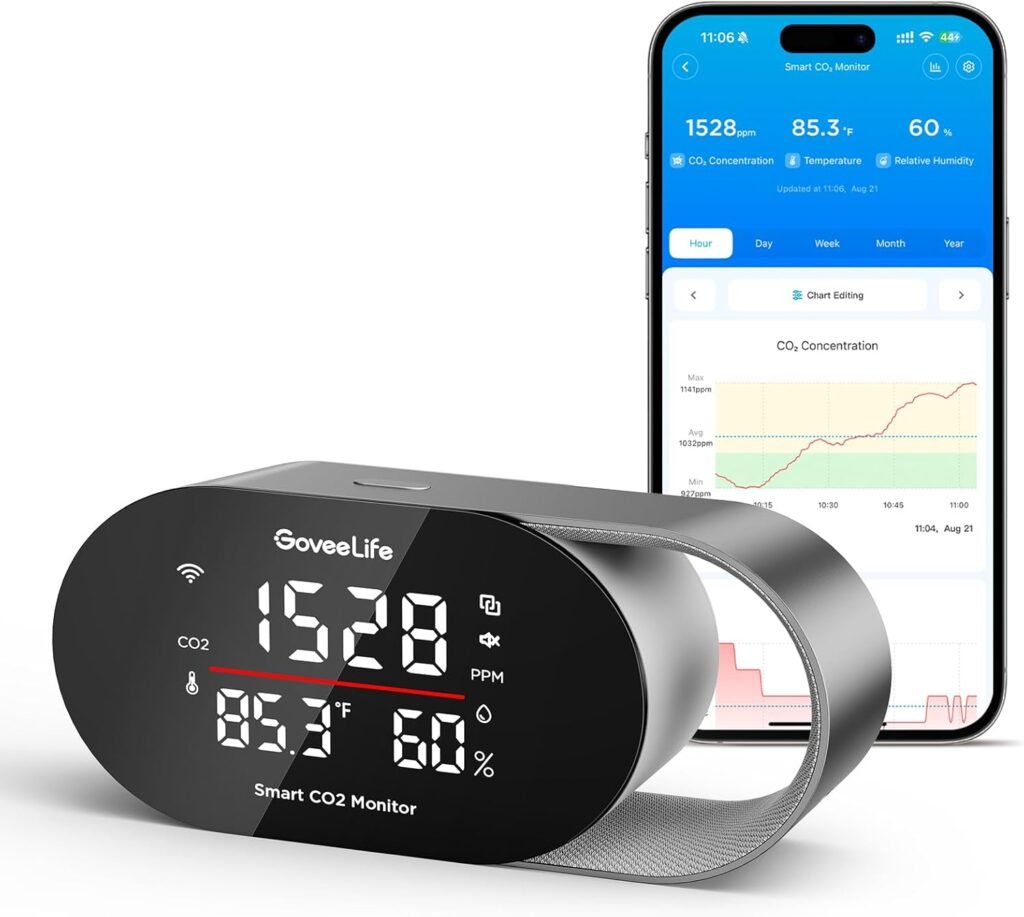
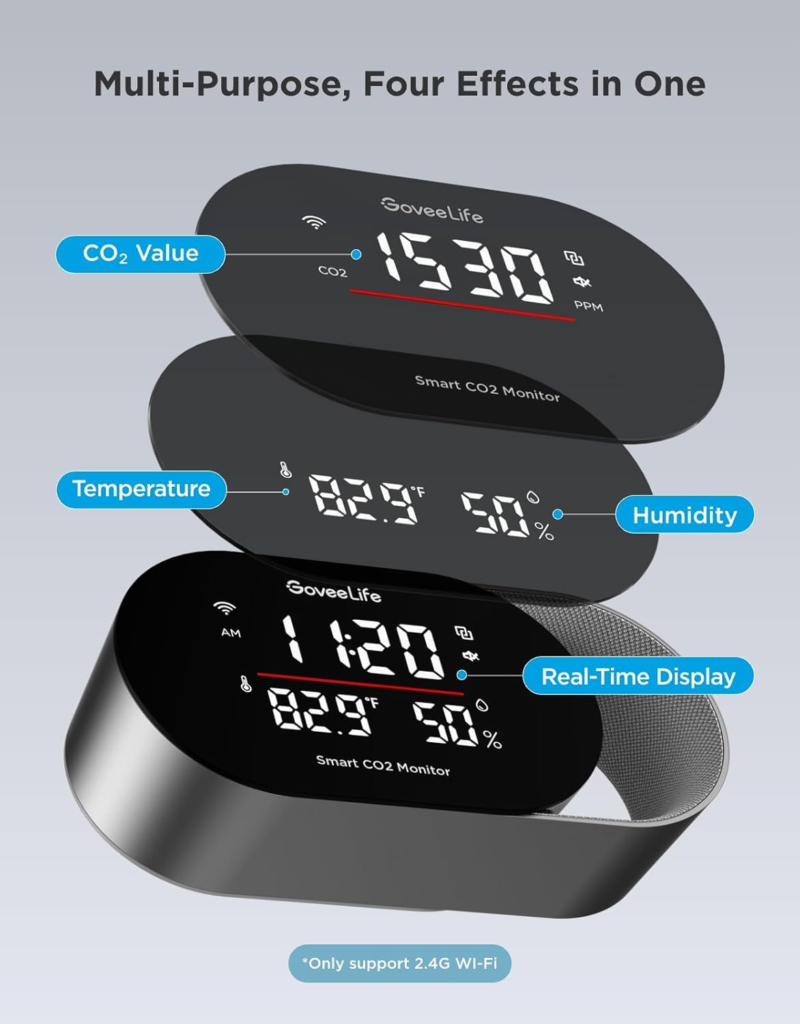
The GoveeLife Smart Air Quality Monitor (CO2 + Temp + Humidity)
This is one of Amazon’s top-rated indoor air quality monitors in the $40-$70 range — a 4-in-1 device tracking CO2 concentration, temperature, humidity, and time on a large real-time display, with Wi-Fi connectivity, app alerts, and compatibility with other GoveeLife smart home devices.
What it tracks:
- CO2 levels (400 to 9,999 ppm) with accuracy of ±(40 ppm + 5%) — reliable enough for real diagnostic use
- Temperature in °F or °C
- Relative humidity (%RH)
- Built-in clock (syncs via app)
How it alerts you:
- Three customizable alarm thresholds — set your own CO2, temperature, and humidity limits
- Audible alarm on-device when levels exceed your set range
- Push notifications through the GoveeLife app
- LED indicator showing four air quality levels at a glance
→ Check current pricing and availability for the GoveeLife Smart Air Quality Monitor on Amazon
Why CO2 Is the Indoor Air Problem Most People Don’t Know They Have
Outdoor air sits around 420 ppm CO2. That’s the baseline. Indoor air can climb well past that in any enclosed space where people are breathing without fresh air exchange. Here’s what the numbers mean in practical terms:
- 400–700 ppm: Outdoor to normal indoor air. No impact on performance.
- 700–1,000 ppm: Common in homes with limited ventilation. Mild drowsiness possible.
- 1,000–1,400 ppm: Measurable cognitive impact. Decision-making and focus decline. Typical closed home office or bedroom level.
- 1,400+ ppm: Significant impairment. Common in bedrooms overnight with the door shut, poorly ventilated meeting rooms, and basements.
Humidity and temperature compound the effect. A room at 1,100 ppm CO2 with 70% humidity and 80°F feels noticeably worse than the same CO2 level at 50% humidity and 70°F. Having all three metrics visible at once is the only way to understand what’s actually going on in a given room.
Before and After: What Changes When You Can See Your Air
Before:
- Home office CO2 readings reaching 1,300–1,500 ppm by early afternoon with door closed
- Bedroom overnight regularly hitting 1,400+ ppm, correlating with low-quality sleep
- No awareness of humidity swings — 35% RH in winter causing dry air symptoms
After:
- Office CO2 stays under 800 ppm with one window cracked — a change that costs nothing
- Bedroom door left slightly open overnight keeps levels under 900 ppm
- Humidifier running when RH drops below 40% — triggered by the monitor reading rather than guesswork
How to Actually Use a Smart Air Quality Monitor
- Audit each room separately. CO2 levels vary significantly by room. A bedroom with the door shut reads differently than an open-plan living area. Move the monitor around for a few days before settling on a permanent location.
- Set meaningful thresholds. The GoveeLife allows custom alert levels. A useful starting point: CO2 alert at 1,000 ppm, humidity low alert at 40% RH and high at 60% RH, temperature based on your personal comfort range.
- Pair it with a correction device. The monitor tells you what’s wrong. An air purifier, humidifier, or simple ventilation fixes it. GoveeLife humidifiers and tower fans link directly to the monitor for automatic response when levels drift out of range.
- Check historical data. The app stores up to two years of readings. Patterns emerge quickly — CO2 spikes every morning before the window gets opened, humidity crashes every January when the heat runs all night.
- Calibrate outdoors first. If initial readings seem off, take the unit outside for ten minutes in open air to calibrate against the ambient CO2 baseline. The app guides you through it.
Smart Home Integration: What It Actually Automates
The GoveeLife monitor connects to the GoveeLife ecosystem, which means compatible humidifiers, tower fans, and dehumidifiers can respond automatically to readings. Set a humidity floor of 45% RH, and the linked humidifier turns on when the monitor detects a drop below that level. No manual adjustment, no checking the app.
Note: standard air purifiers cannot reduce CO2 — only fresh air exchange does. The automation value with purifiers is on the PM2.5 and particulate side, not CO2. For CO2, the fix is ventilation, and the monitor’s alert function handles the notification side of that.
For a broader overview of smart home devices that work together to improve both comfort and efficiency, the smart gadgets for every room guide covers how air monitoring, climate control, and lighting automation stack for a fully connected home environment.
Q&A: GoveeLife Air Quality Monitor Questions
Q: Does this require a subscription to use the app features?
No. The GoveeLife app is free and includes real-time monitoring, alert customization, historical data access, and device automation. There is no premium tier required for core functionality.
Q: Does it work without Wi-Fi?
Yes. The display shows real-time CO2, temperature, and humidity readings without any app or Wi-Fi connection. Wi-Fi enables app monitoring, alerts, historical data, and device automation. The clock display requires app connection to sync.
Q: Where should I place it?
At breathing height in the room you want to monitor — a desk, nightstand, or countertop. Keep it away from direct sunlight, HVAC vents, and exterior walls where temperature and humidity fluctuate. Start with whichever room you spend the most time in.
Q: How accurate is the CO2 reading?
Accuracy is ±(40 ppm + 5%) in the 400–1,000 ppm range, which is within the margin needed for practical home use. It uses a built-in air pressure sensor to maintain accuracy at different altitudes. For medical or laboratory use, a dedicated professional instrument is appropriate. For home diagnostics and air quality awareness, this accuracy level is more than sufficient.
Q: Does it detect carbon monoxide?
No. The GoveeLife monitor tracks CO2 (carbon dioxide), temperature, and humidity. It is not a carbon monoxide (CO) detector and should not be used as one. Carbon monoxide detectors serve a different safety function and are required by code in most homes — they should be installed separately regardless of what air quality monitor you use.
Final Take
Most smart home gadgets add convenience. The GoveeLife Air Quality Monitor adds something more useful: information you can’t get any other way. CO2 buildup in a closed room is invisible, odorless, and genuinely affects how you think and sleep. Having a number on the wall that tells you when to crack a window is a small change that compounds across every day you spend in that room.
At its price point, it’s one of the higher signal-to-cost gadgets available for the home. Plug it in, check the reading, and you’ll know within the first hour whether your indoor air is working for you or against you.
See what’s in your air. Fix what’s off. Feel the difference.
→ Check current pricing for the GoveeLife Smart Air Quality Monitor on Amazon
Affiliate disclosure: This article may contain affiliate links. If you purchase through them, SimpleHomeGadgets.com may earn a small commission at no additional cost to you.